Batch Smart File Renamer
Rename a whole folder with six rules that work together: add text, remove text, replace, change case, number in sequence, and add a date. Stack them — number a set of photos and stamp them with today's date in one pass — and watch every new name appear before a single file is renamed. Duplicates and illegal names are caught first. Entirely on your PC.



Six rules on one screen, applied together in one pass.
See it in action
About Batch Smart File Renamer
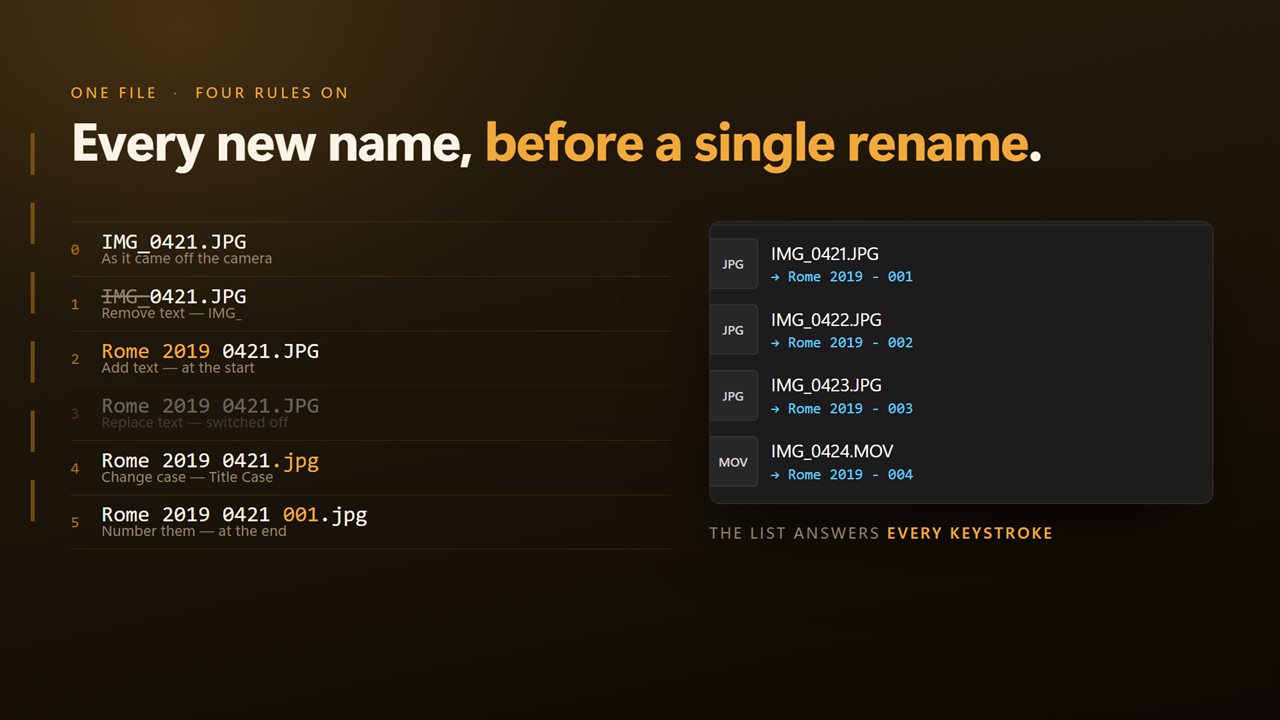
Four hundred photos called DSC_0001 through DSC_0400, and what you want is Rome 2019 - 001 through Rome 2019 - 400.
Batch Smart File Renamer does it in one pass, and shows you the result before it does anything.
Six rules, one screen
Add text at the front or the back. Remove text. Replace one thing with another. Change the case to lower, UPPER, Title or Sentence. Number the files in sequence. Add a date.
They are all in front of you at once, and they apply together in a fixed order that is written down — so a set can be stripped of its camera prefix, given a name, numbered and dated in a single run instead of four.
The preview is the app
Every file shows what it is about to be called, updated the moment you change a rule. Nothing is renamed until you press the button, and what you saw is what you get.
Numbering that sorts properly
Choose where the numbers start and how many digits they are padded to — so you get 001, 002, 003 and a folder that sorts in the right order, rather than 1, 10, 100, 2.
Today's date, in a form that sorts
Stamp the batch with today's date, written year first — 2026-09-12 — so a folder of dated files sorts into order on its own. It goes at the front or the back, and you never type it.
It checks before it acts
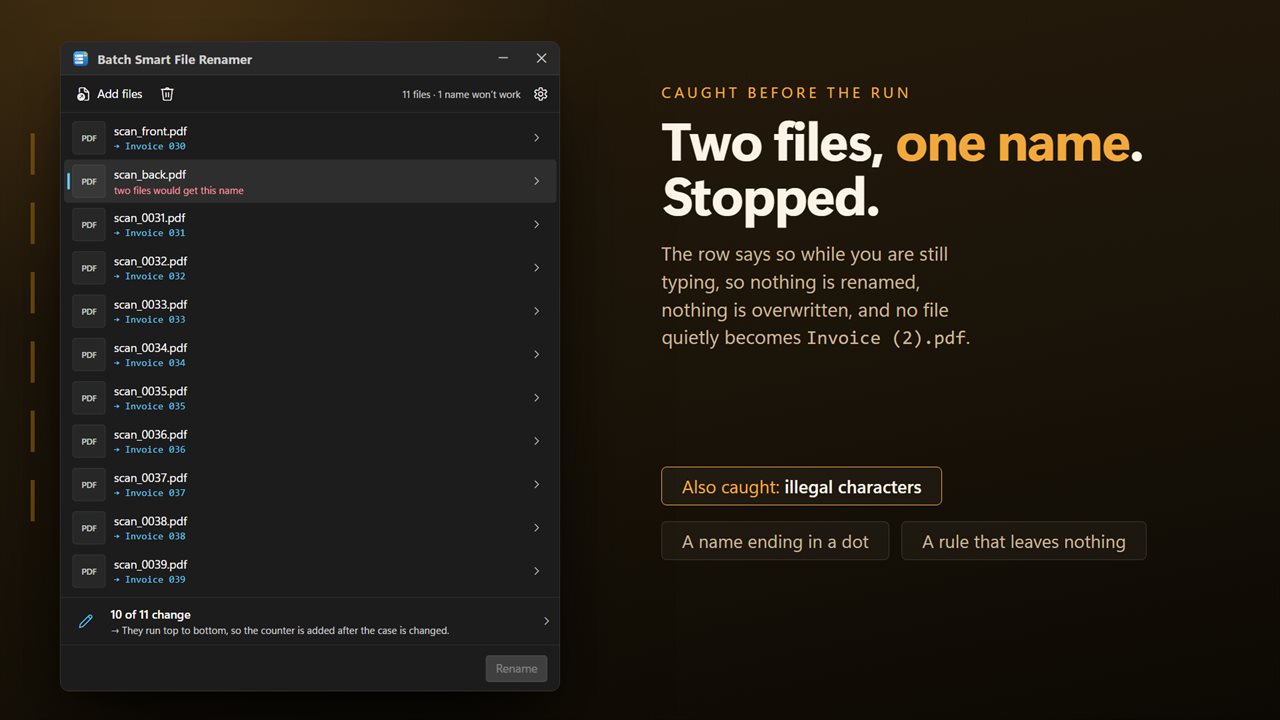
If two files would end up with the same name, you are told before anything runs. A name containing a character Windows cannot store is refused with the character named. The extension is never part of any rule, so a rename cannot change which program opens a file, and nothing is ever renamed on top of an existing file.
Drop in files from as many different folders as you like; they all go through in one pass.
On your PC, and nowhere else
There is no account, no sign-in, no upload and no telemetry. The app has no network code in it at all and works with the connection turned off.
Features
- Six rules on one screen: add text, remove text, replace, change case, number, add date
- Rules stack — number a set and date it in the same pass, in a fixed order you can see
- Every file's new name is shown before anything is renamed
- Numbering from any starting number, padded to the digits you want: 001, 002, 003
- Add today's date at the front or the back, written 2026-09-12 so the folder sorts by it
- Change case to lower, UPPER, Title or Sentence
- Warns when two files would end up with the same name
- Extensions are left alone, so a rename cannot break which app opens the file
- Refuses a name Windows cannot store, and never renames over an existing file
- No account, no upload and no server processing
Details
- Works on
- Windows 10 (1809 or later) and Windows 11
- Download
- About 16.2 MB
- Version
- 2.0.5, updated October 2026
- First released
- September 2022
- Price
- $2.49 once. No subscription.
- Category
- Productivity
What's new in 2.0.5
- All six rules are on one screen and stack together. They used to be on separate pages, one at a time — a set can now be stripped, renamed, numbered and dated in a single pass
- Every file's new name is shown as you change a rule, before anything is renamed
- Numbering takes a starting number and a digit padding, so 001, 002, 003 sorts correctly
- Two files that would end up with the same name are flagged before the run, not discovered during it
- A name Windows cannot store is refused with the offending character named, and nothing is ever renamed over an existing file
- Extensions are left out of every rule, so a rename can no longer change which program opens a file
- Files from any number of different folders can be renamed in one run
- A redesigned interface, in light or dark, and it can follow Windows instead if you prefer
Questions
Anything else? Ask us
Which versions of Windows does it run on?
Windows 10 (version 1809 or later) and Windows 11.
Is it a subscription?
No. Batch Smart File Renamer is a one-time purchase of $2.49, and updates are included.
How do I get it?
EvlarSoft apps are moving to direct downloads from this site. Ask to be notified and we will email you as soon as Batch Smart File Renamer is ready to download.
More from EvlarSoft
 Fast File Splitter and JoinerSplit a file, or join the parts back up, without reading anything first.
 Secure File ShredderDelete files so that what was in them is actually gone.
 Batch File MoverFind the files you want by name, contents, kind, date or size, then move, copy or recycle all of them in one go.