Barcode Label Generator & Reader
Make barcode labels and print them at true size, each one checked to scan first. Paste a list from Excel, pick from 10 barcode types, and print on label rolls, Avery sheets or plain paper. Read codes from a picture, your screen, your webcam or your phone.
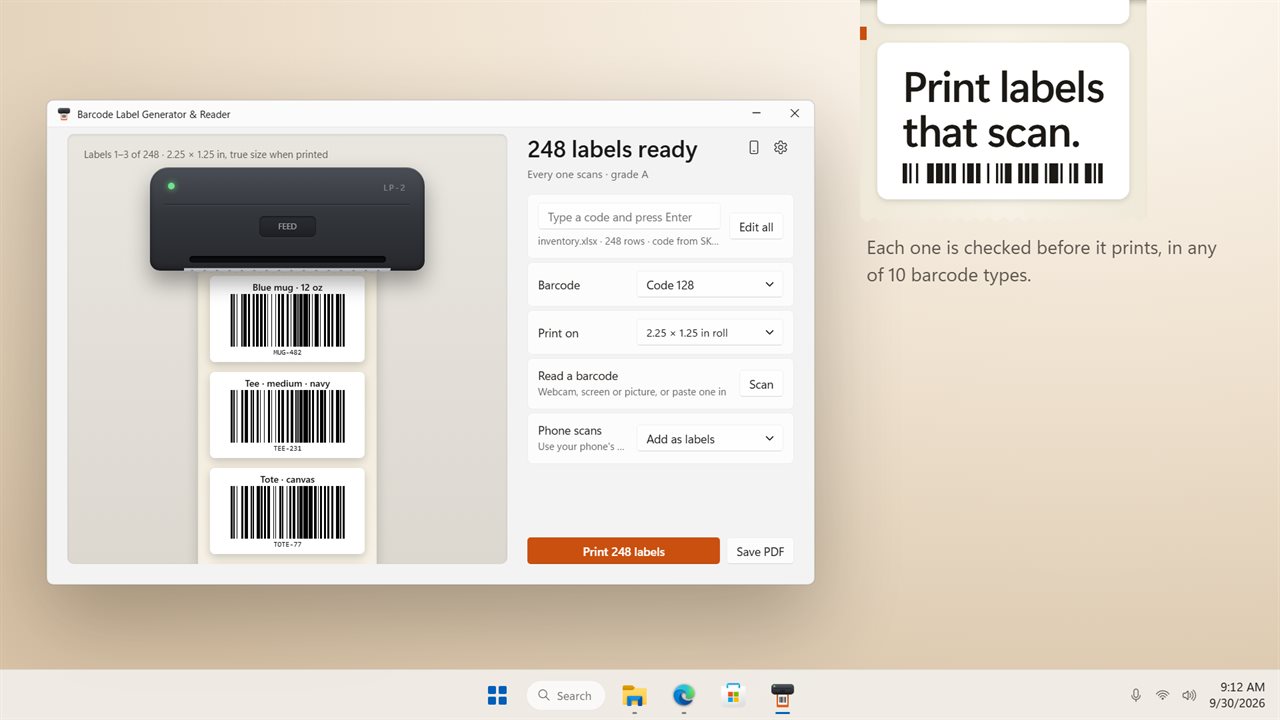
Print barcode labels that scan. Each one is checked before it prints.
See it in action
About Barcode Label Generator & Reader
Make barcode labels that scan, print them at true size, and read barcodes back with your webcam, your screen or your phone.
Labels that scan
Every label is checked to scan before you print it, and gets a grade from A to F. If a code is too long for the label, its bars are too thin, or it has no blank margin for a scanner to find, the app tells you which label and why. Bars line up with your printer's dots at 203, 300 or 600 dpi, so the edges print sharp.
10 barcode types
Code 128, EAN-13, UPC-A, UPC-E, EAN-8, Code 39, Code 93, ITF, QR code and Data Matrix. Check digits are added for you.
From your spreadsheet
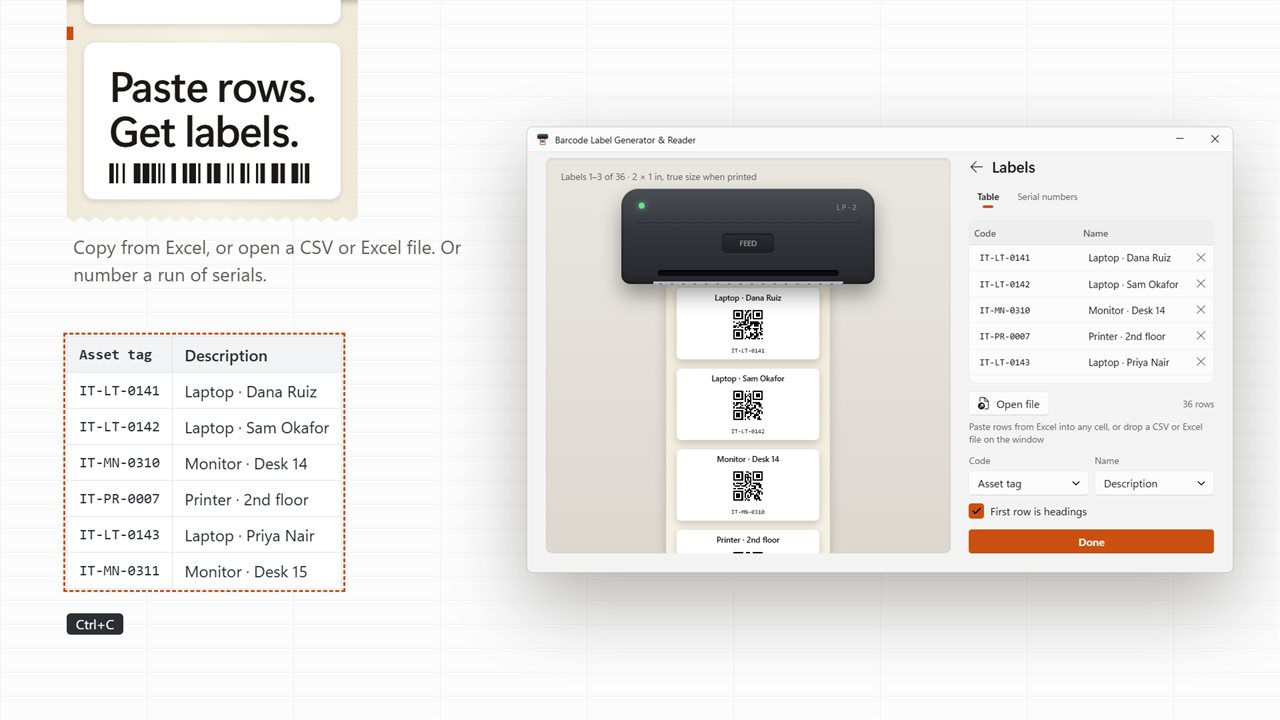
Paste rows straight from Excel, or open a CSV or Excel file, and you get a label for every row. The code and name columns are found from the headings, and you can change them. Or type codes one at a time, or number a run of serials with your own prefix, up to 10,000 labels. Click any label to change it.
Print on what you have
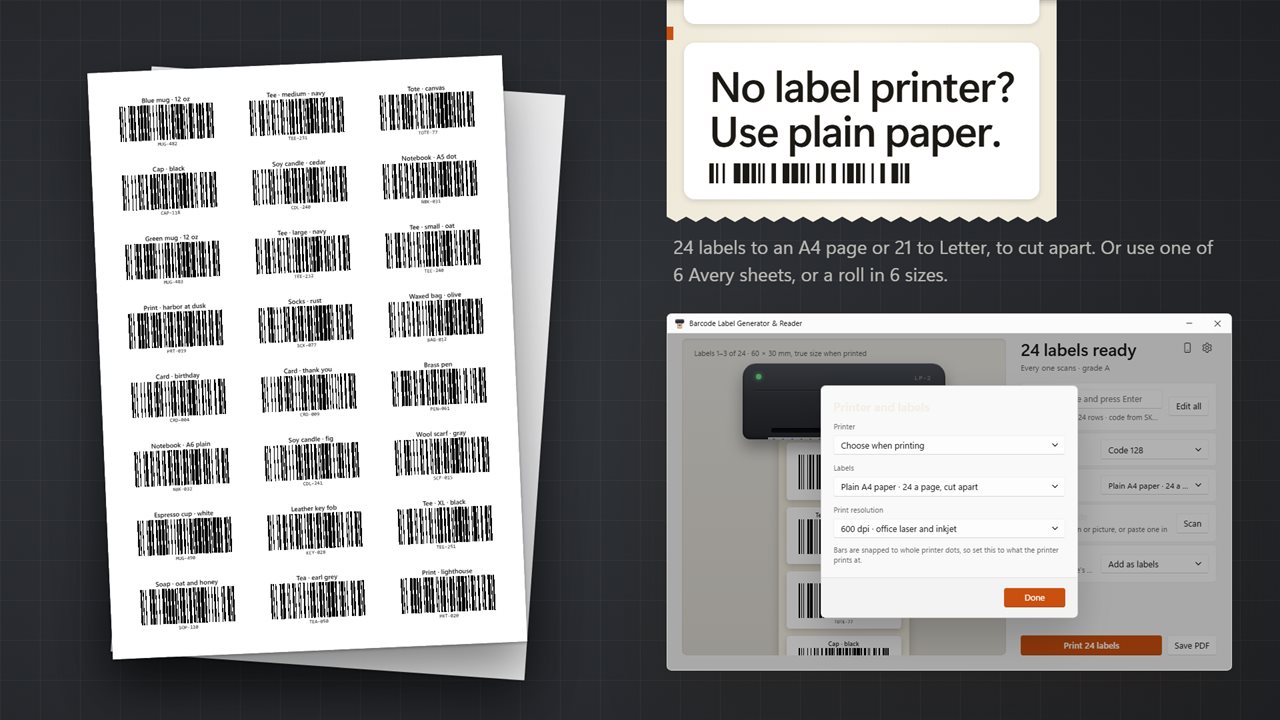
Label rolls in six sizes, from 1.5 × 1 in to 4 × 6 in shipping labels and 62 × 29 mm. Avery 5160, 5161, 5163, 5167, L7160 and L7651 sheets. No label printer? Print 24 labels to a plain A4 page or 21 to a Letter page, and cut them apart. Labels go through the Windows print dialog to any printer, or save them as one PDF at true size, or as SVG or PNG pictures.
Read barcodes on your PC
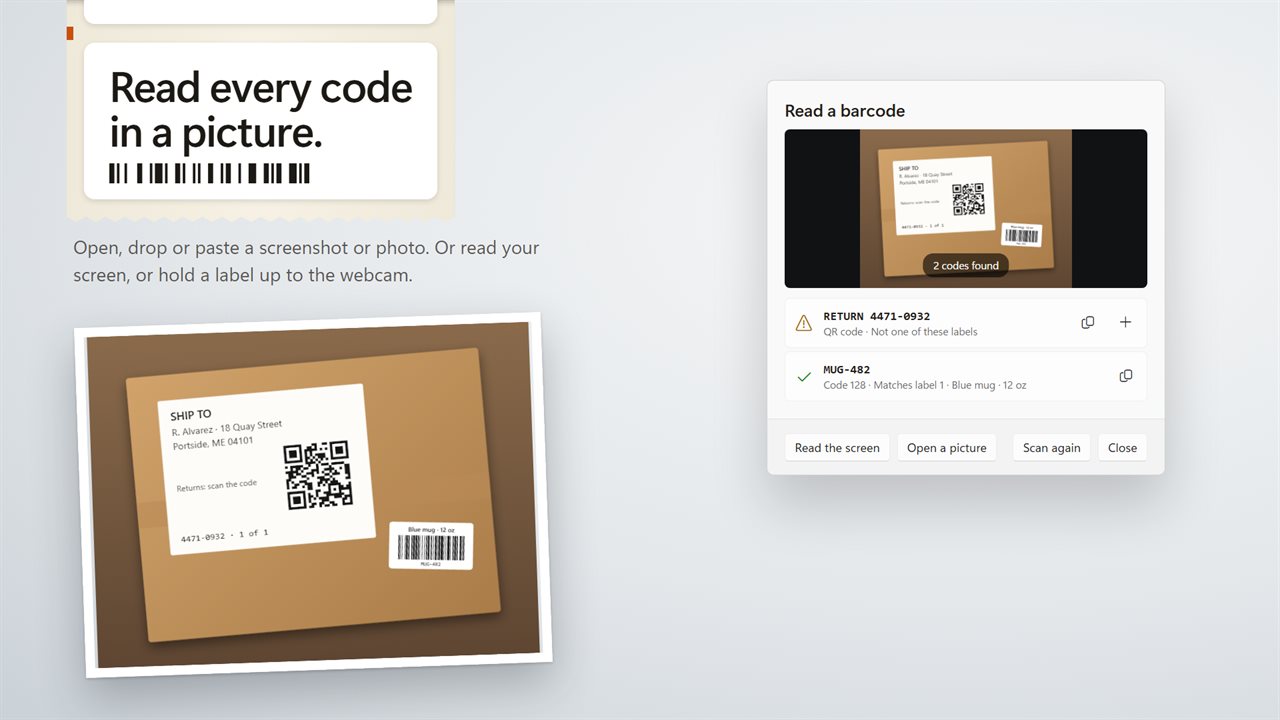
Open, drop or paste a screenshot or photo, and every barcode and QR code in it is read. Or read whatever is on your screen, or hold a printed label up to your webcam. The app tells you which of your labels a code matches, and adds new ones with one click.
Your phone as a scanner
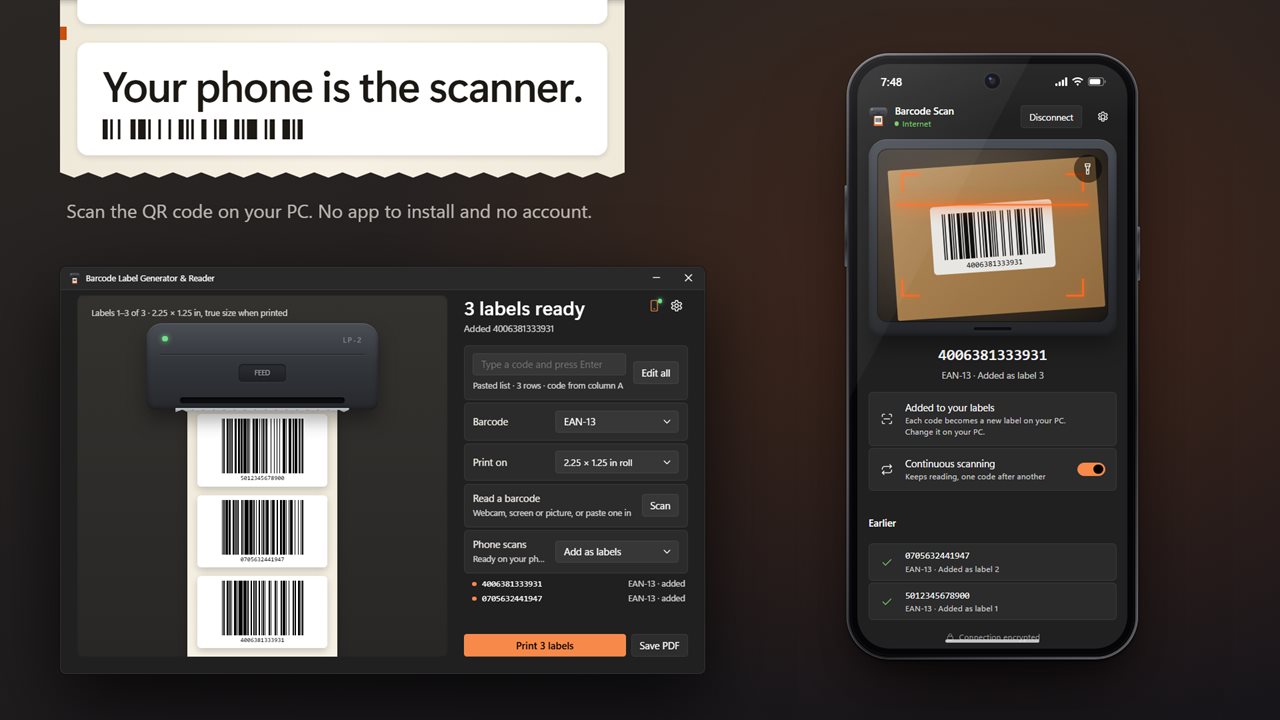
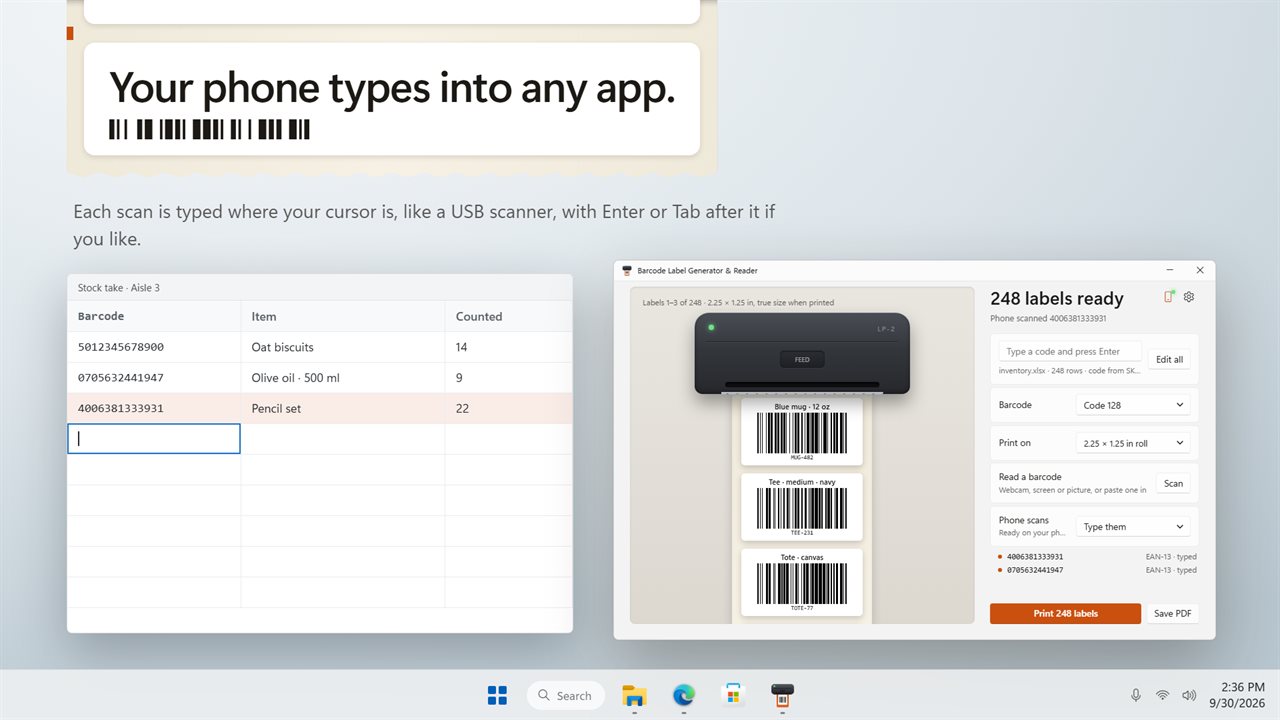
Scan the code on your PC with your phone's camera, and your phone becomes a barcode scanner. There is no app to install and no account. Each scan becomes a new label, or is typed into whatever app you are using, just like a USB scanner, with Enter or Tab after it if you like. Scan one code after another, or one at a time, with a flashlight for dim corners. Your phone reads the code itself and sends only the code. The camera picture never leaves your phone.
Features
- Make barcode labels in 10 types: Code 128, EAN-13, UPC-A, UPC-E, EAN-8, Code 39, Code 93, ITF, QR code and Data Matrix
- Every label is checked to scan before you print, and graded from A to F with the reason when a label falls short
- Type codes one at a time, or paste rows straight from Excel
- Open a CSV or Excel file, and the code and name columns are found from the headings
- Number a run of serials with your own prefix, starting number and digits, up to 10,000 labels
- Click any label to change its code or its name, or to delete it
- A name prints above the code and the readable text under it, or turn the text off
- Print at true size on label rolls: 2.25 × 1.25, 2 × 1, 1.5 × 1, 3 × 2 and 4 × 6 in, and 62 × 29 mm
- Or on Avery 5160, 5161, 5163, 5167, L7160 and L7651 sheets
- No label printer? Print 24 labels to an A4 page or 21 to a Letter page, then cut them apart
- Bars line up with your printer's dots at 203, 300 or 600 dpi, so edges print sharp
- Prints to any printer through the Windows print dialog
- Save every label at true size in one PDF, or as SVG or PNG pictures, one file per label
- Read barcodes and QR codes in a picture: open it, drop it on the window or paste it
- Read every code on your screen, or hold a printed label up to your webcam
- A code read back tells you which of your labels it matches
- Use your phone as a barcode scanner. Scan the code on your PC with its camera, with no app to install and no account
- Phone scans become new labels, or are typed into the app you are using like a USB scanner, with Enter or Tab after each one if you like
- Scan one code after another or one at a time, with a flashlight button on phones that have one. The camera picture never leaves your phone
- Light and dark themes, or match Windows
Details
- Works on
- Windows 10 (1809 or later) and Windows 11
- Download
- About 3.4 MB
- Version
- 2.0.3, updated October 2026
- First released
- March 2023
- Price
- $1.99 once. No subscription.
- Category
- Productivity
What's new in 2.0.3
- New: print labels at true size on label rolls, Avery sheets or plain A4 and Letter paper
- New: every label is checked to scan before it prints
- New: paste rows from Excel, open a CSV or Excel file, or number a run of serials
- New: Code 93, ITF and Data Matrix, for 10 barcode types in all
- New: read barcodes from a picture, your screen or your webcam
- New: use your phone as a barcode scanner, adding labels or typing into any app
- Save every label in one PDF at true size, or as SVG or PNG pictures
Questions
Anything else? Ask us
Which versions of Windows does it run on?
Windows 10 (version 1809 or later) and Windows 11.
Is it a subscription?
No. Barcode Label Generator & Reader is a one-time purchase of $1.99, and updates are included.
How do I get it?
EvlarSoft apps are moving to direct downloads from this site. Ask to be notified and we will email you as soon as Barcode Label Generator & Reader is ready to download.