PortScanner
See every connection your PC has open and which program opened it. TCP connections and UDP listeners appear on a patch bay, grouped by program, one numbered socket each, with a lamp showing whether it is carrying traffic, listening or winding down. Click any socket for the process ID, both addresses and the name behind the far end.
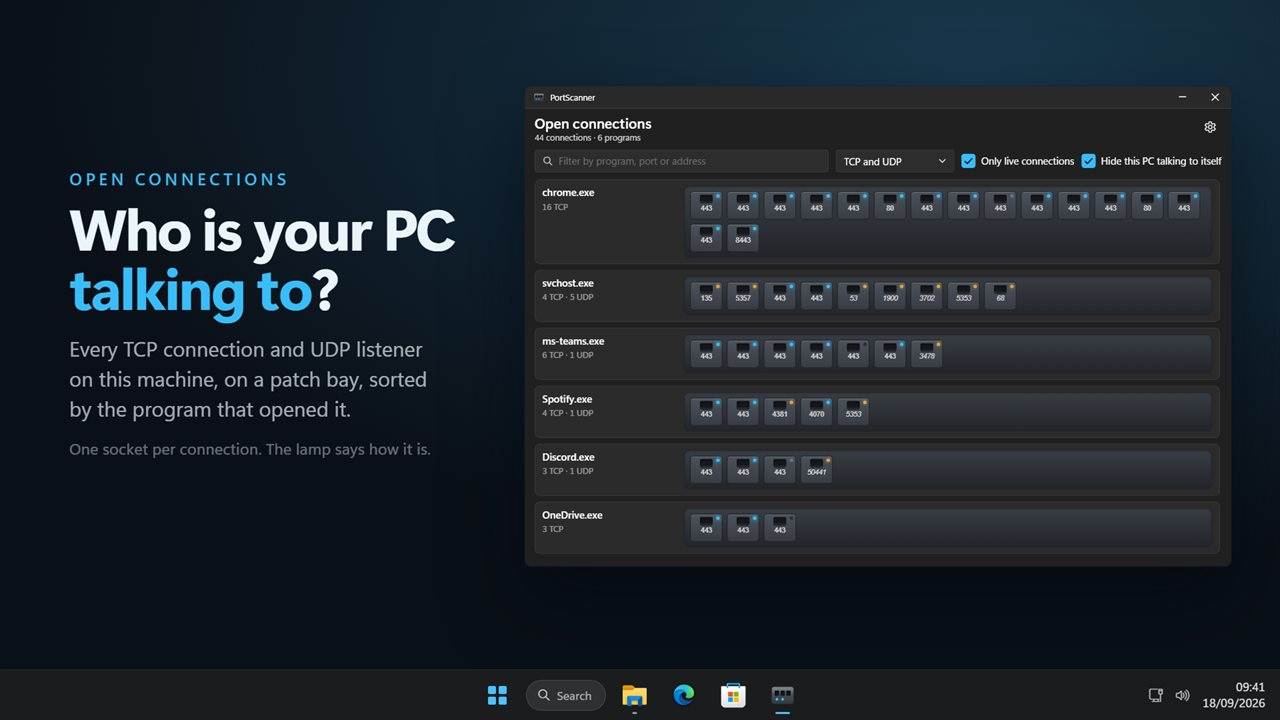
Every connection your PC has open, grouped by program.
See it in action
About PortScanner
Something on this PC is talking to the internet. PortScanner shows you what, and to where.
It reads the connection tables Windows itself keeps and lays them out as a patch bay: one socket for every TCP connection and every UDP listener, grouped under the program that opened it, with the busiest program first.
The bay
Each socket carries the port number that means something. On an outgoing connection that is the far port - 443 tells you it is a secure web connection, where the throwaway number on your own side tells you nothing. On a listener it is the port being listened on.
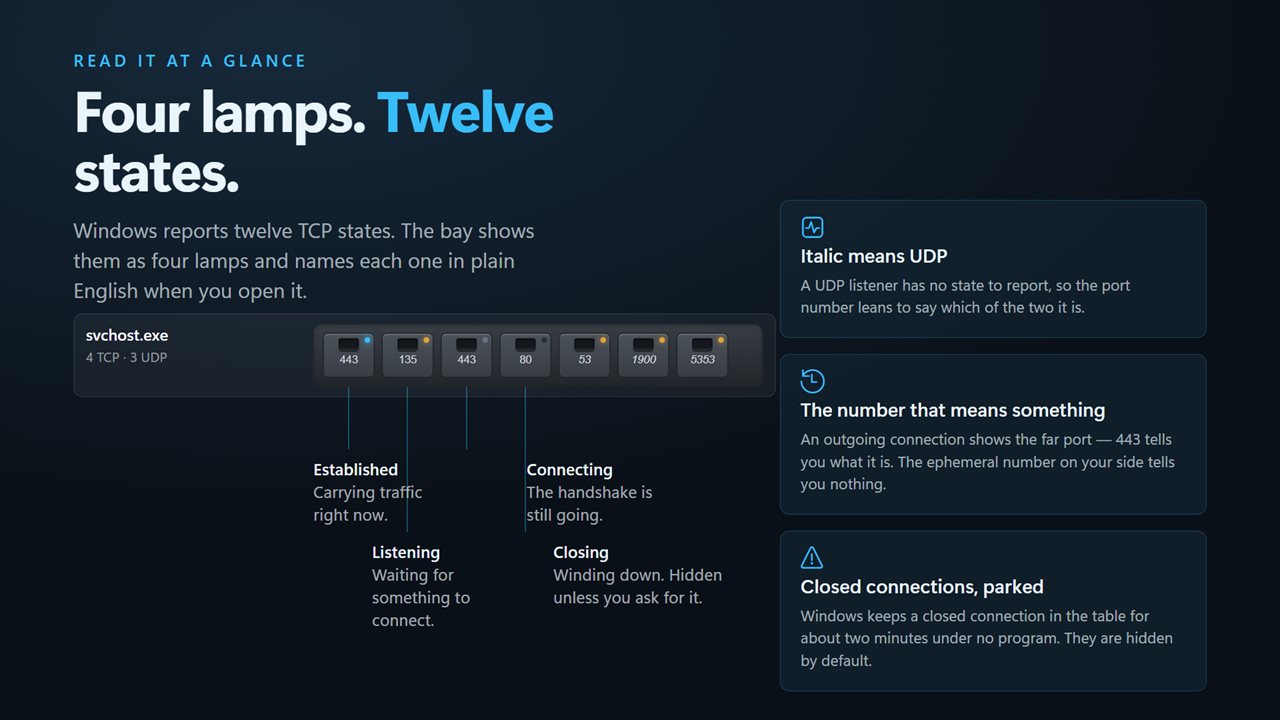
A lamp on each socket says how the connection is: lit for established and carrying traffic, amber for listening and waiting, blinking while a handshake completes, and dark for one that is winding down. A UDP listener has no state to report, so its number leans over instead.
Click any socket
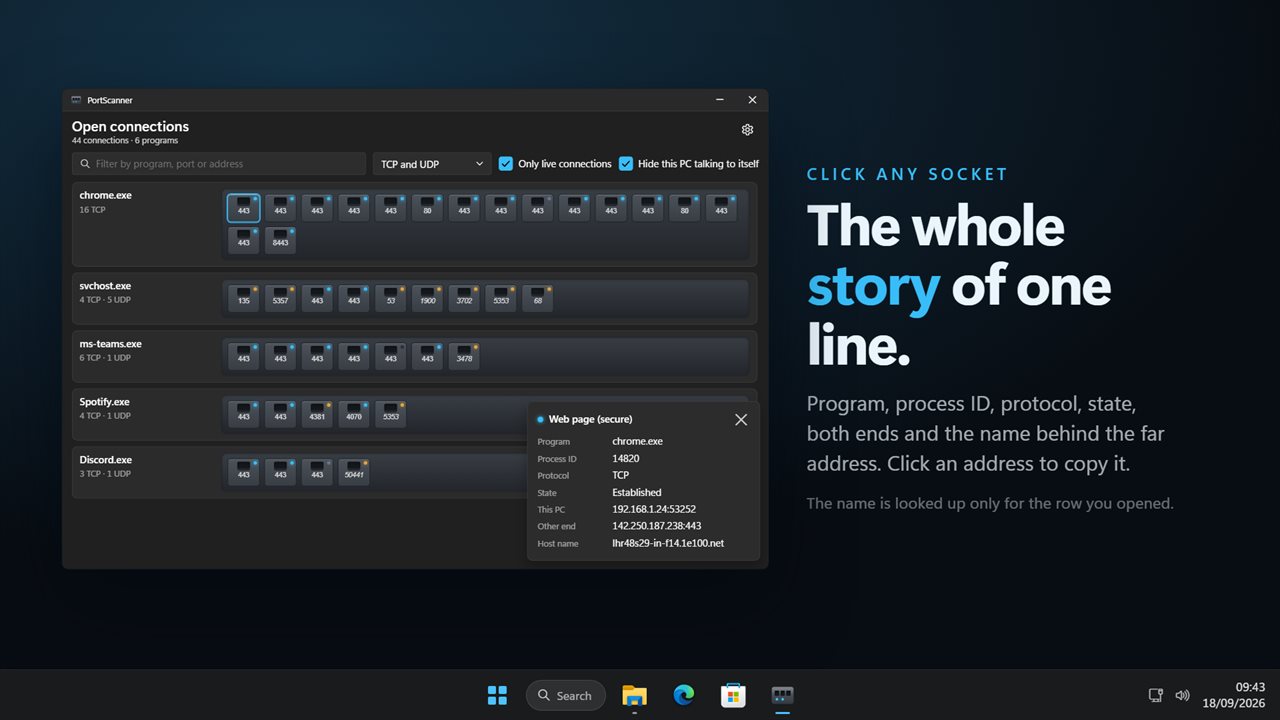
The details panel names the program, its process ID, the protocol, the state in plain English, the address and port on this PC, and the address and port at the other end. Click either address to copy it. The name behind the far address is looked up for that one connection - doing it for every row on every refresh would stall the list.
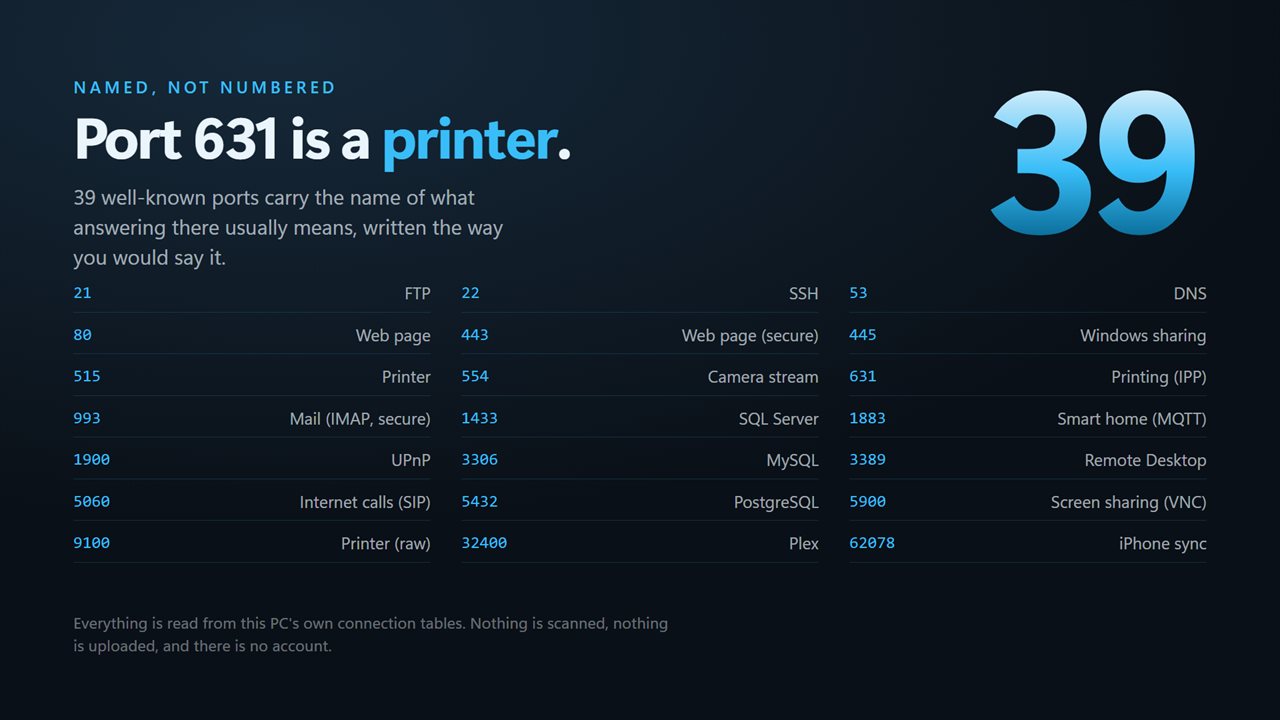
39 well-known ports carry the name of what answering there usually means, written the way you would say it: Printing (IPP), Camera stream, Windows sharing, Remote Desktop, Screen sharing (VNC), Smart home (MQTT), Plex, iPhone sync.
Find the one you want
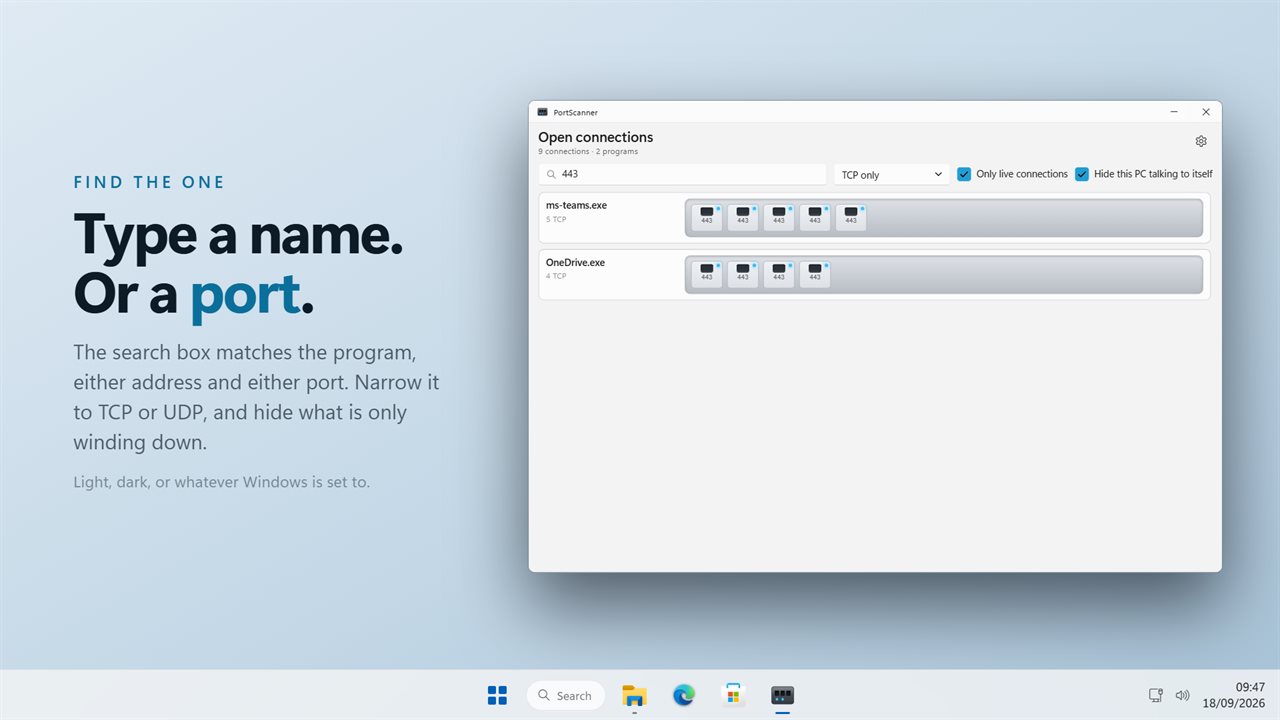
Type into the search box and it matches the program name, either address and either port. Narrow the list to TCP only or UDP only. Hide the connections that are merely winding down, and hide this PC talking to itself over 127.0.0.1.
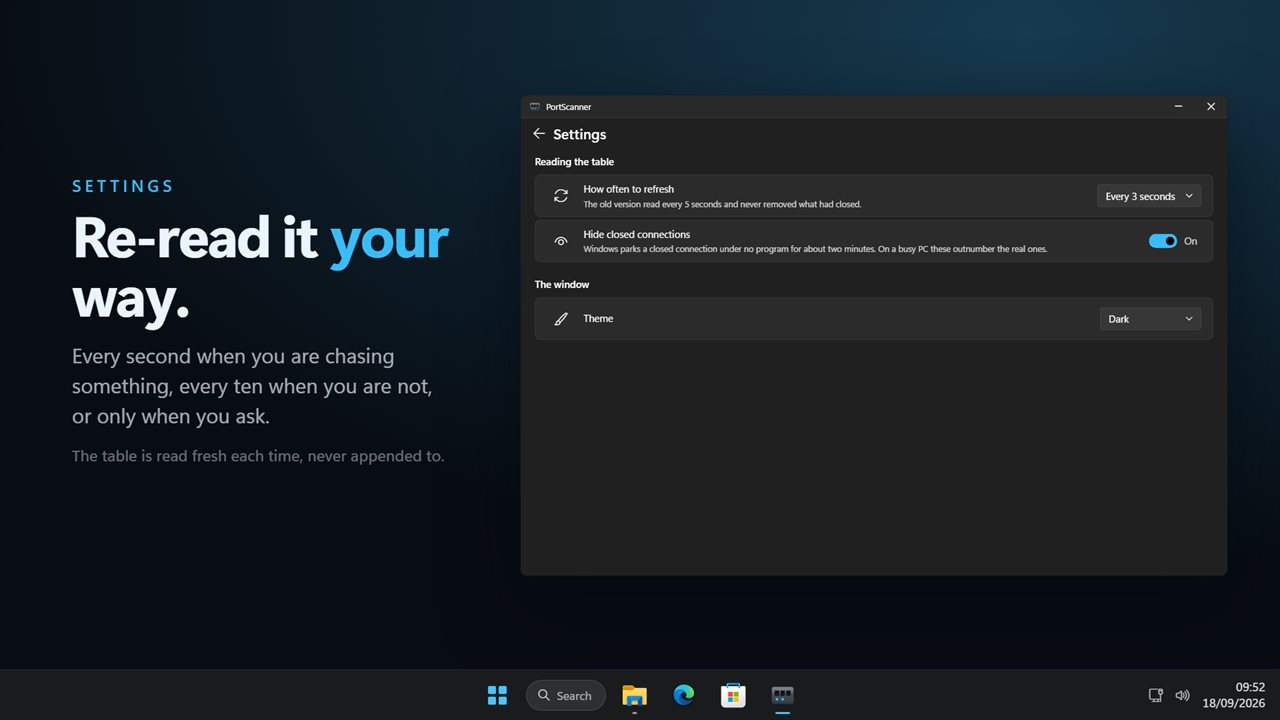
Windows parks a connection that has closed in the table for about two minutes, belonging to no program. On a busy PC those outnumber the real ones, so they are hidden by default and can be shown.
How often
Re-read the table every second when you are chasing something down, every 3 or 10 seconds when you are not, or only when you ask. Each read is fresh, so a connection that has gone is gone from the window too.
What it is for
Working out which program is using the network. Confirming a service you started is actually listening. Checking that something you closed really did let go of its port. Seeing what a machine of yours reaches out to.
It reads this PC's own tables and nothing else. There is no account, nothing is uploaded, and it works with no connection at all.
Features
- Every TCP connection and UDP listener open on this PC, with the program that opened each one
- Connections are grouped by program, busiest first, on a patch bay of numbered sockets
- A lamp on every socket: established, listening, connecting, or winding down
- Click a socket for the program, process ID, protocol, state, both addresses and both ports
- 39 well-known ports are named in plain words - Printing (IPP), Camera stream, Remote Desktop, Plex
- All twelve TCP states Windows reports, written out rather than abbreviated
- Looks up the name behind the far address, for the one connection you opened
- Click either address in the details to copy it
- Search matches the program name, either address and either port
- Narrow to TCP only or UDP only, hide connections that are winding down, hide this PC talking to itself
- Refresh every second, every 3 seconds, every 10 seconds, or only when you ask
- Hides the closed connections Windows parks under no program for a couple of minutes
- The table is read fresh every time, so a connection that has gone disappears
- Dark theme by default, with light and match-Windows options
- Reads this PC only. Works offline, with no account and nothing uploaded
Details
- Works on
- Windows 10 (1809 or later) and Windows 11
- Download
- About 2.4 MB
- Version
- 2.0.3, updated October 2026
- First released
- May 2023
- Price
- $2.99 once. No subscription.
- Category
- Utilities & tools
What's new in 2.0.3
- New: a patch bay of sockets, grouped by the program that opened each connection
- New: a lamp per socket for established, listening, connecting and closing
- New: click a socket for the program, process ID, both ends and the name behind the far address
- New: 39 well-known ports named in plain words
- New: search by program, port or address, with TCP-only and UDP-only filters
- New: choose how often to re-read, from every second to only when you ask
- Fixed: connections that have closed now leave the window instead of staying until relaunch
- Fixed: the only-active filter now keeps the right states
- New: dark theme by default, with light and match-Windows options
Questions
Anything else? Ask us
Which versions of Windows does it run on?
Windows 10 (version 1809 or later) and Windows 11.
Is it a subscription?
No. PortScanner is a one-time purchase of $2.99, and updates are included.
How do I get it?
EvlarSoft apps are moving to direct downloads from this site. Ask to be notified and we will email you as soon as PortScanner is ready to download.
More from EvlarSoft
 Bluetooth Device ScannerEvery phone, watch, earbud, TV and tag broadcasting over Bluetooth near you — what it is, who made it, and how far away.
 Network Indicator WidgetSee what your network is actually doing.
 DNS SwitcherEvery address you type is looked up by a DNS server, and by default that is whoever your provider picked.