Python Script IDE
A real editor for Python scripts — syntax color, a tab per file, and a Run button. Python 3.14 ships inside, so there is nothing to install.
An editor, a Run button and an assistant that can see your file — in one window, with nothing to configure.
See it in action
About Python Script IDE
Most people who write a Python script are not running a development environment. They have a .py file, Notepad, and a command prompt in another window.
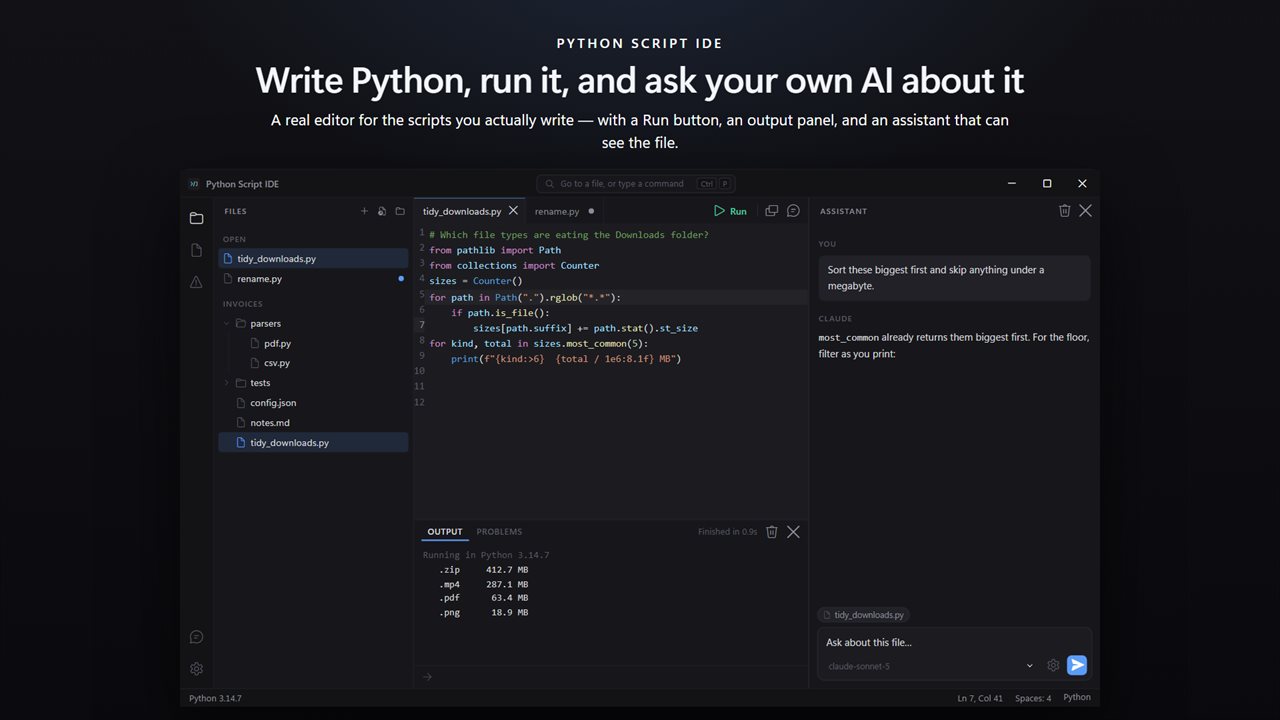
This is the editor for that. It opens the file, colours it properly, runs it with a keypress, and shows you what it printed — in one window, with nothing to set up.
Write it
Syntax colouring, code folding, bracket matching and completion that knows Python's keywords, its builtins and the standard library modules you are most likely to reach for. A tab per file, each keeping its own undo history. Line numbers, active-line highlight, and the choice between tabs and spaces where it belongs — in Settings, not in an argument.
Open a folder and the tree shows the whole project: the JSON your script reads, the CSV it writes, the notes beside it. All of them open, and the ones that are not Python are highlighted too.
Run it
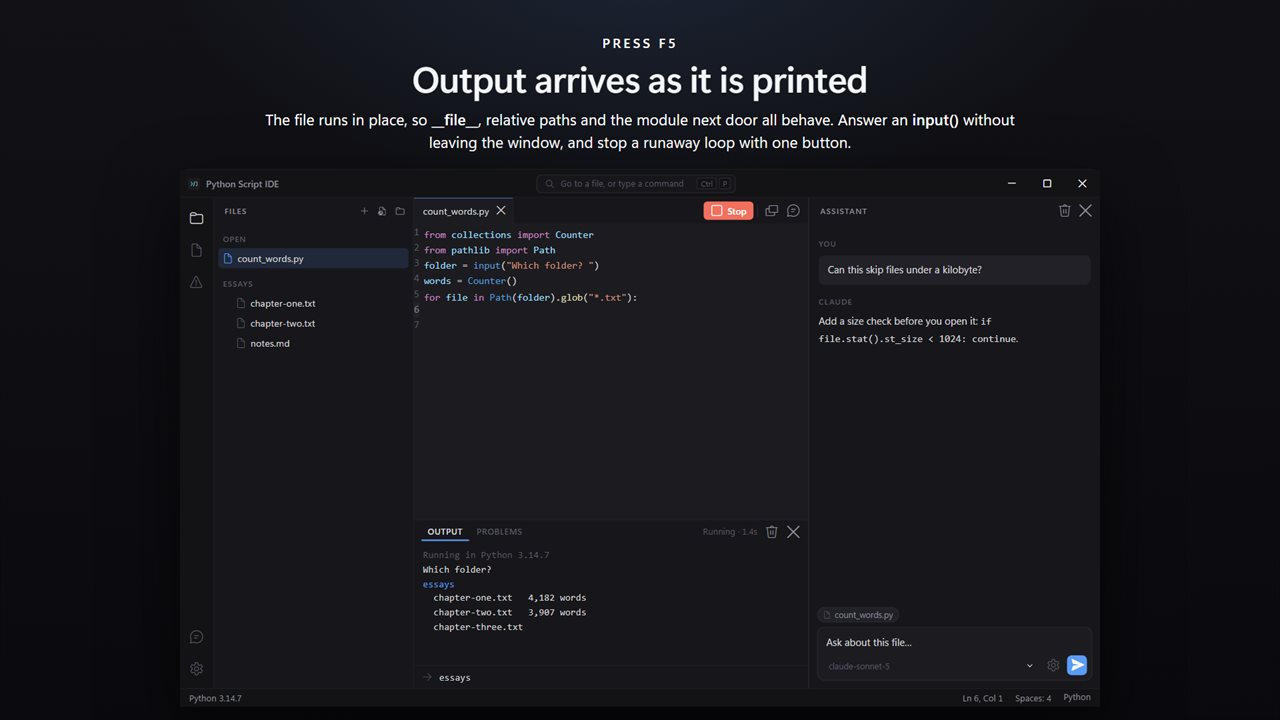
F5. The file runs in place, so __file__, relative paths and the module in the next file all behave exactly as they would from a terminal. Output arrives in the panel as it is printed rather than all at once when the script exits, so a long loop shows progress instead of nothing.
If the script asks a question with input(), answer it in the window. If it will not stop, one button stops it.
When it breaks
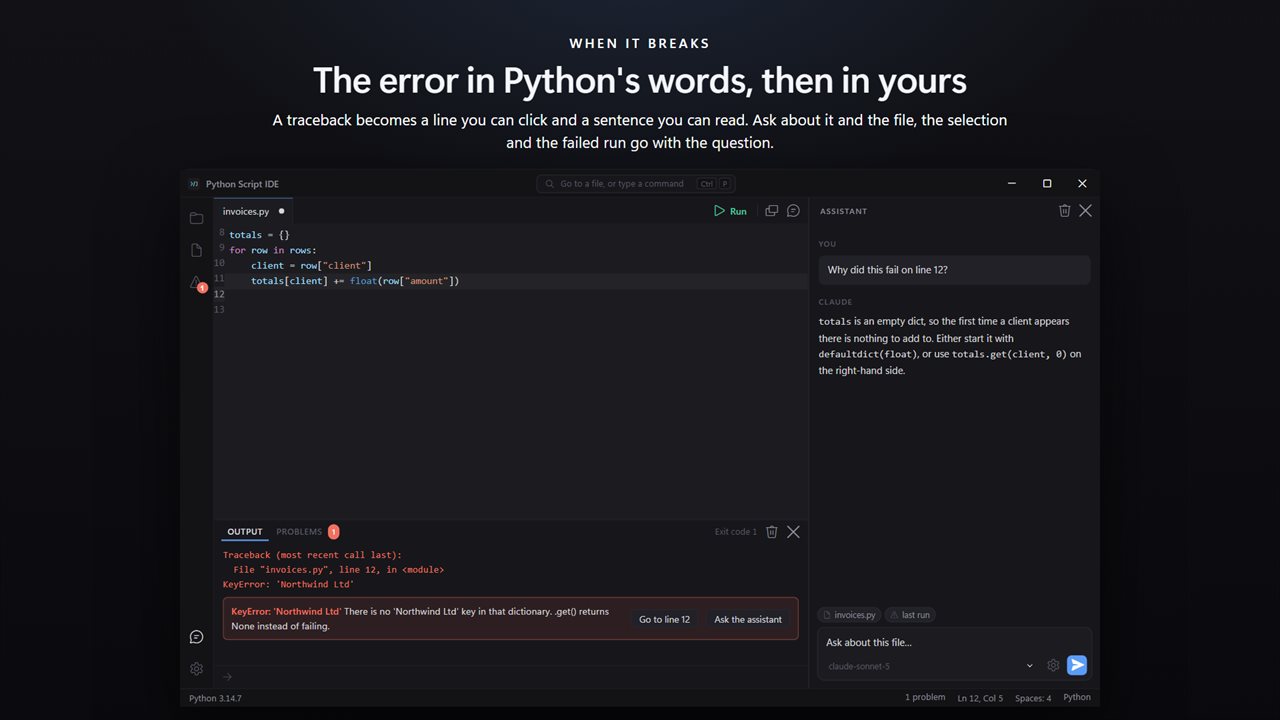
A traceback is a wall of text that names a file and a line. Here it becomes a line you can click, and underneath it, the same error in a sentence: what a NameError actually means, why an IndentationError is complaining about a space, which module is missing and how to install it.
Ask about it
The assistant panel can see the file you are on. Select some lines and it sees those too; run something that fails and the traceback goes with your question. You are not pasting code into a browser tab and pasting the answer back.
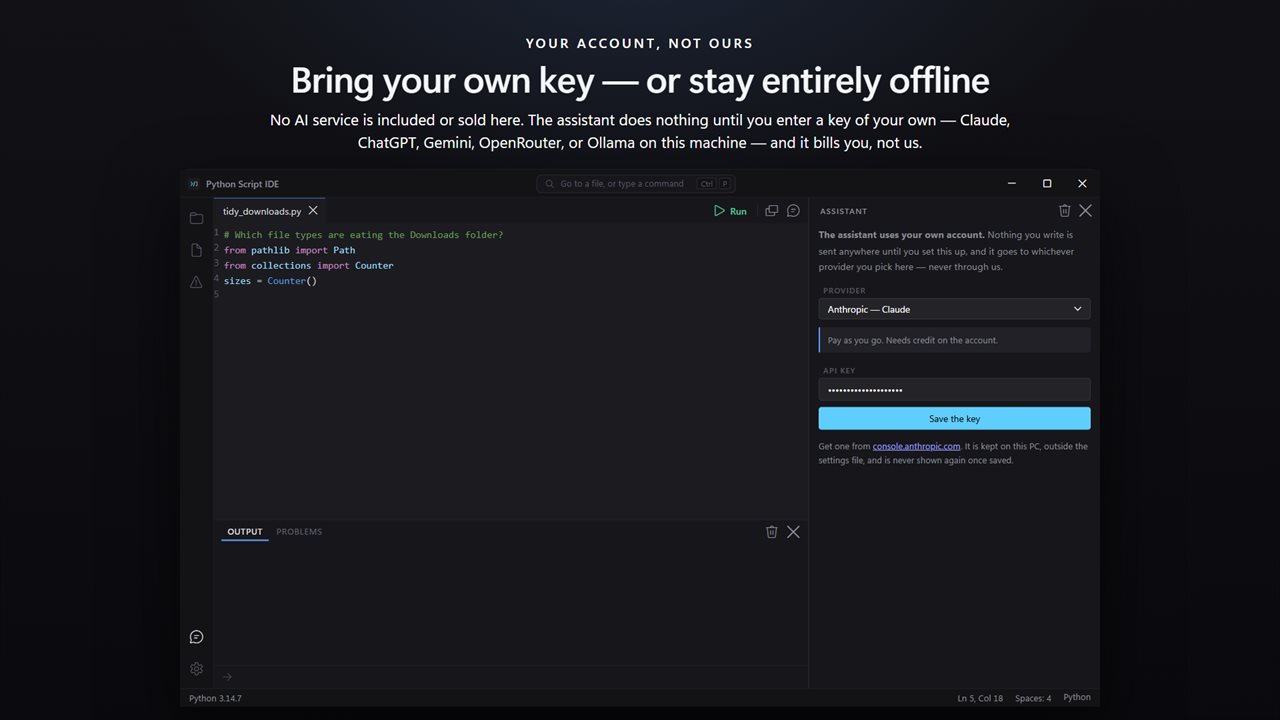
No AI service is included with this app, and none is being sold to you here. The assistant panel is inert until you enter an API key of your own, and the price of this app buys the editor — not the model behind that key. Whatever you spend asking questions is billed to you by the provider you chose, on your own account, and never passes through us.
Bring a key from Claude, ChatGPT, Gemini or OpenRouter, and the app asks each provider which models your key can reach rather than shipping a list that goes stale. Free models are marked as free. If you would rather nothing left the machine at all, point it at Ollama or LM Studio running locally and it works offline.
The key is written to this PC and kept out of the settings file. Requests go out from the app itself, not from the page, and the app's own content policy forbids it talking to anywhere else.
Nothing to install
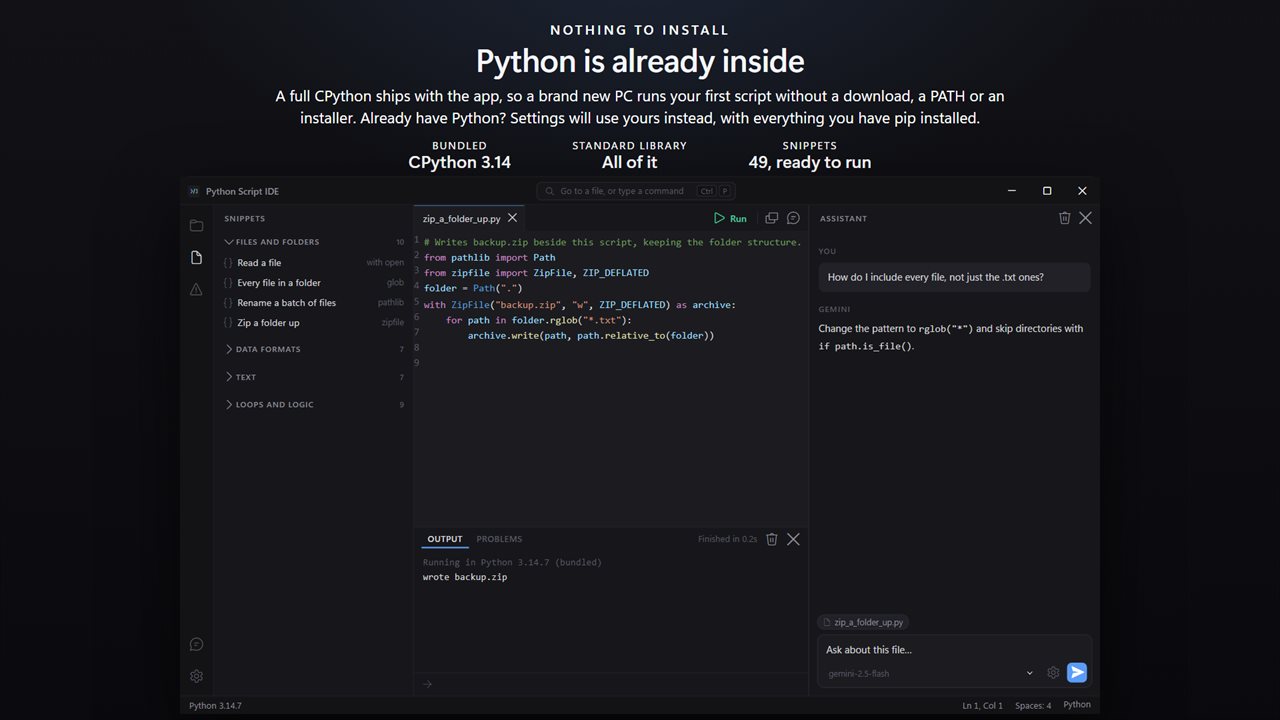
A complete CPython 3.14 ships inside the app. On a PC that has never had Python, your first script runs immediately — no download, no PATH, no installer, no version to choose.
If you already have Python, Settings will use yours instead, with every package you have pip installed. You can also point it at a specific python.exe, and the status bar always says which interpreter a run actually used.
49 things to Start from
Forty-nine snippets in six sections: files and folders, data formats, text, loops and logic, structure, and this machine. Reading a CSV by column name, hashing a file, zipping a folder, retrying something that failed, formatting a number properly.
Each one opens in its own tab as a complete script with its sample data already in it, so you can press F5 and watch it work before you change a line. All of them use only the standard library, so they run under the bundled Python with nothing added.
What it does not do
It is an editor and a runner, not a full development environment. There is no debugger, no breakpoints, no package manager and no source control. If you want those, you want something bigger — and if you have ever wanted them, you probably already have it.
No account. No sign-in. No ads. The app makes no network call of its own; the only thing that ever leaves your PC is a question you type into the assistant, going to the provider whose key you entered, or feedback you choose to send.
Built for Windows 11, and at home on Windows 10.
Features
- A real editor for Python: syntax colour, folding, brackets, and a tab per file with its own undo
- Press F5 to run. Output streams into the panel line by line, not in one lump at the end
- Answer an input() prompt without leaving the window, and stop a runaway loop with one button
- Tracebacks become a line you can click and a sentence in plain English
- No AI service is included or sold here — the assistant is inert until you enter your own API key
- Bring your own key: Claude, ChatGPT, Gemini or OpenRouter — or run Ollama on this PC and stay offline
- Whatever the assistant costs is billed to you by that provider, on your own account, never through us
- An assistant that can see the file you are on, the lines you selected and the run that just failed
- Free tiers still count: Gemini's, OpenRouter's free models, or a local model — all on your own account
- CPython 3.14 ships inside, so a brand new PC runs your first script with nothing to install
- Already have Python? Settings will use yours instead, with everything you have pip installed
- 49 ready-made snippets in six sections — files, data, text, loops, structure and this machine
- Every snippet opens in its own tab and runs as it is, so you can read it by pressing F5
- A collapsible file tree showing the whole project, not only the Python in it
- The JSON, Markdown, CSV and SQL beside your script are highlighted too
- Ctrl+P finds any file or command; the rest of the keys are the ones you already know
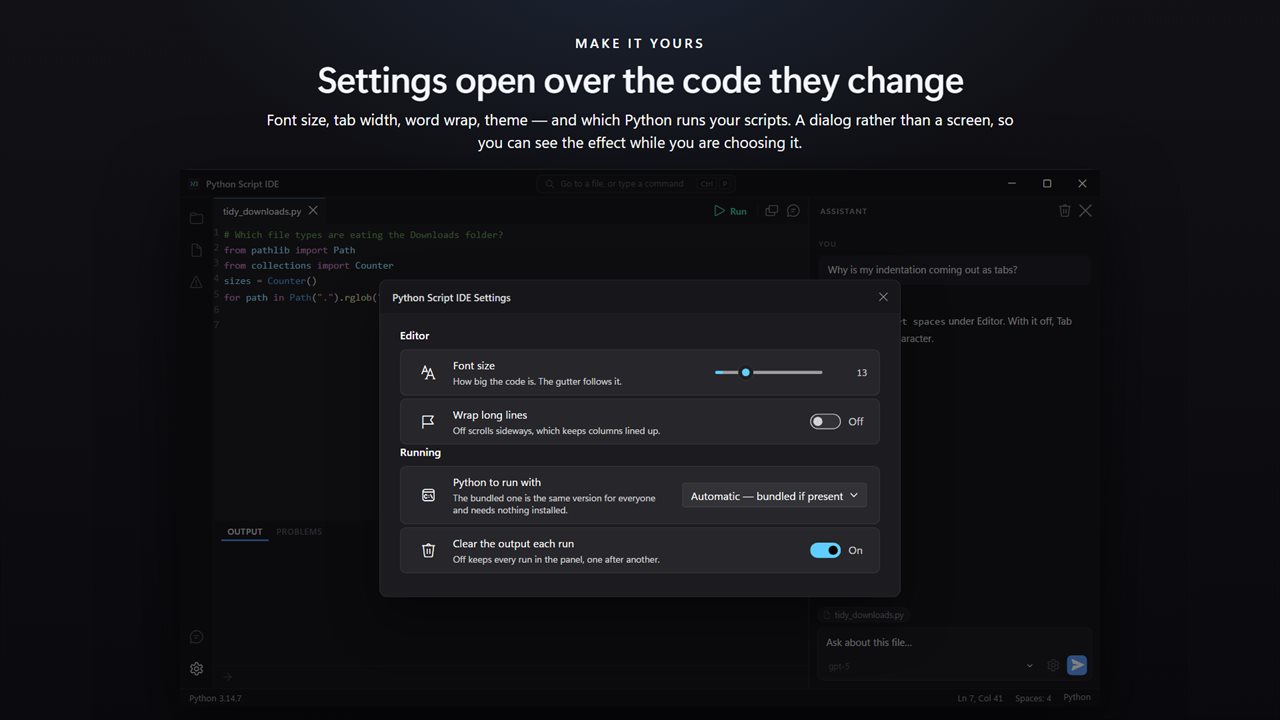
- Font size, tab width, spaces or tabs, word wrap and theme, all in one dialog
- Your key is kept on this PC, outside the settings file, and is never shown again once saved
- No account, no sign-in, no ads, and no network call the app makes for itself beyond feedback you choose to send
Details
- Works on
- Windows 10 (1809 or later) and Windows 11
- Download
- About 27.3 MB
- Version
- 4.0.3, updated October 2026
- First released
- August 2023
- Price
- $1.99 once. No subscription.
- Category
- Developer tools
What's new in 4.0.3
- A real Python editor: syntax colour, folding, bracket matching and completion
- A tab per file, each with its own undo history
- F5 runs the file in place; output streams into the panel as it prints
- input() answered in the window, and one button to stop a runaway script
- Tracebacks explained in plain English, with a clickable line
- An assistant that sees the open file, the selection and the last failed run
- Your own key: Claude, ChatGPT, Gemini, OpenRouter, or Ollama offline on this PC
- CPython 3.14 ships inside, so nothing needs installing first
- Or use the Python you already have, with the packages you already installed
- 49 runnable snippets in six collapsible sections
- A file tree for the whole project, not only the Python in it
- Light and dark, following Windows
Questions
Anything else? Ask us
Which versions of Windows does it run on?
Windows 10 (version 1809 or later) and Windows 11.
Is it a subscription?
No. Python Script IDE is a one-time purchase of $1.99, and updates are included.
How do I get it?
EvlarSoft apps are moving to direct downloads from this site. Ask to be notified and we will email you as soon as Python Script IDE is ready to download.
More from EvlarSoft
 Rapid FTP ServerShare a folder with every device on your Wi-Fi.
 Rapid HTTP ServerServe a folder as a website on your Wi-Fi and watch the real page at desktop and phone width as you work.
 Regex TesterRegex Tester reads your regular expression back in plain English, piece by piece, and lights up the matches in your own text or a whole folder of files.
 Self Signed Certificate MakerTrusted HTTPS for localhost in one click.