VidToAudio
Get the sound out of your videos. VidToAudio saves the audio from MP4, MKV, MOV, AVI and more as MP3, WAV, M4A, AAC, FLAC, OGG, Opus or WMA, a whole batch at a time. See the sound as a waveform, keep only the part you want, add fades and even out the loudness. It all happens on your PC, and nothing is uploaded.
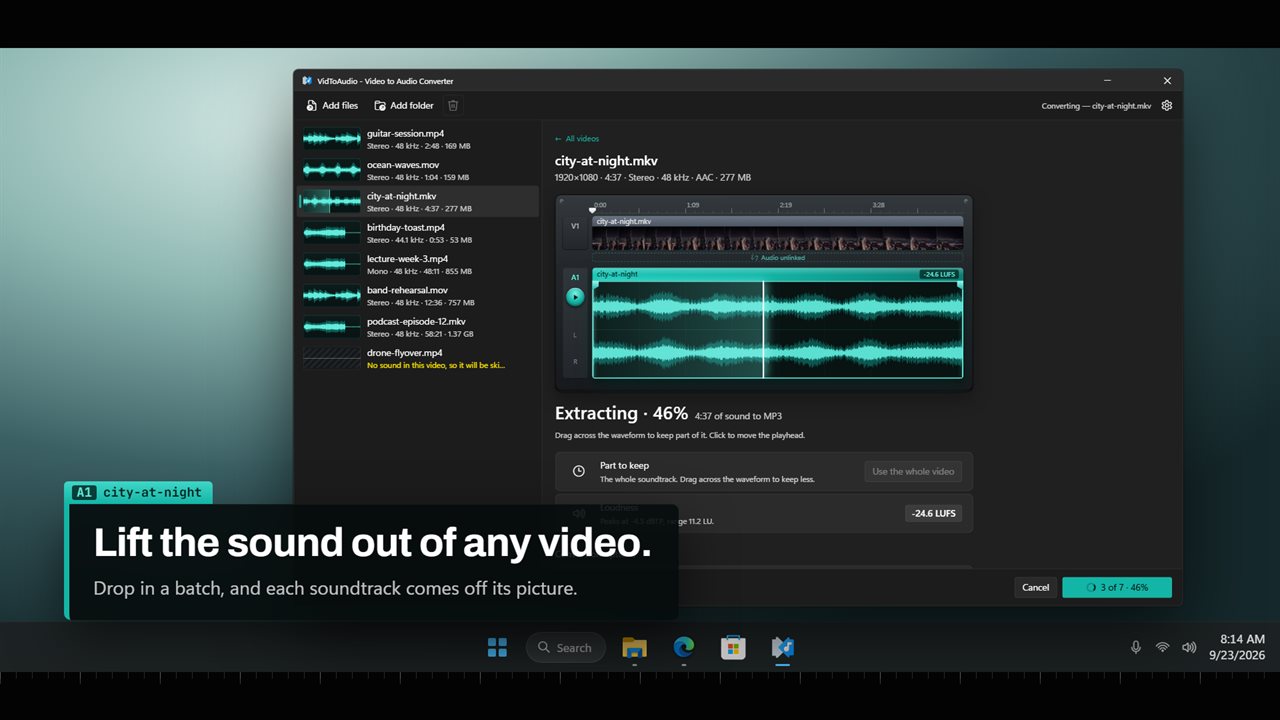
Lift the sound out of any video.
See it in action
About VidToAudio
A song in a concert clip, a talk you recorded, the sound from a phone video. VidToAudio takes the sound out of the picture and saves it as an audio file you can play anywhere.
Drop in your videos
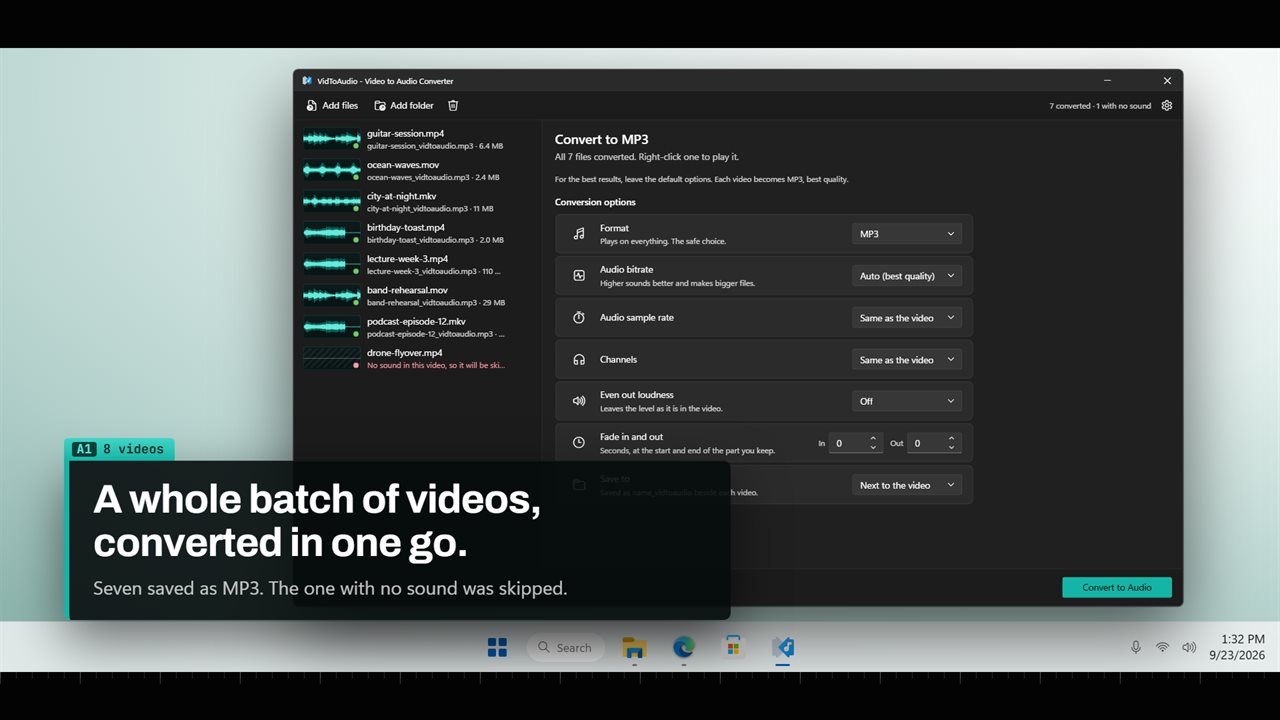
Drag videos onto the window, add them with a click, or add a whole folder. VidToAudio reads MP4, MKV, MOV, AVI, WMV, WebM, FLV, MPEG, M2TS, 3GP, VOB and more, and it converts audio files too. Every video in the list shows its length, channels and size, and a small waveform so you can tell them apart at a glance.
Pick a format
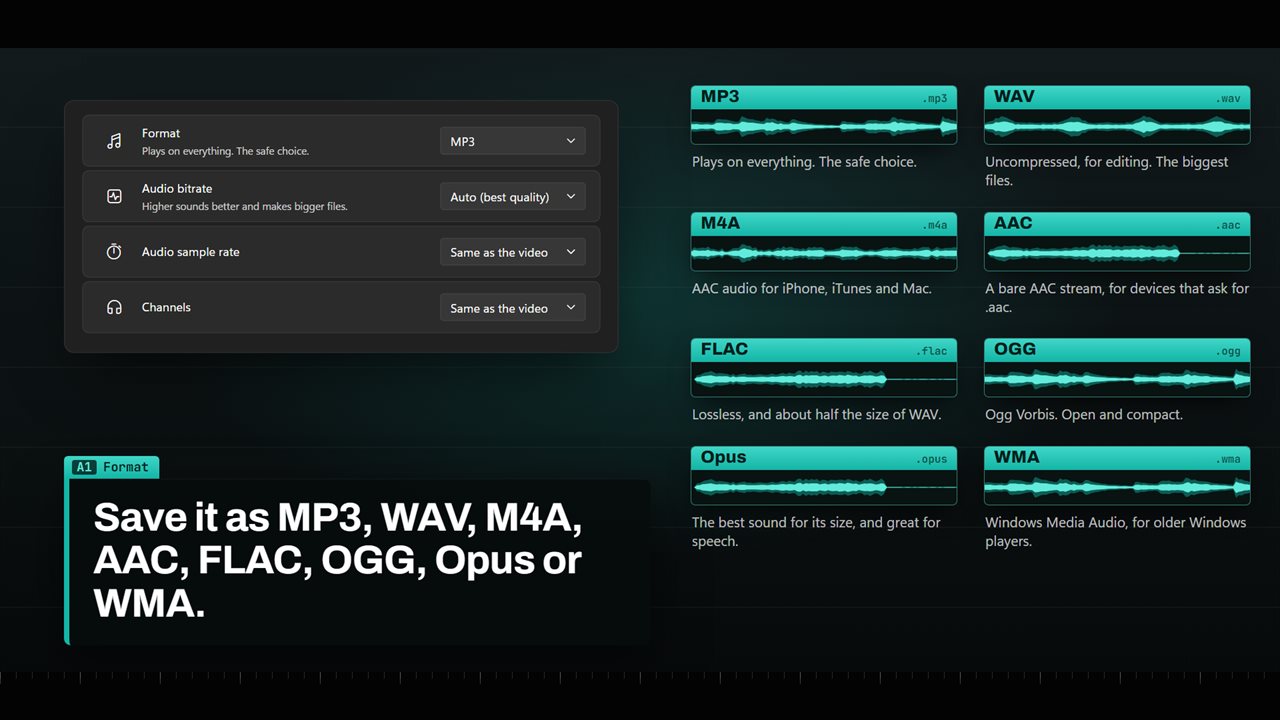
MP3 plays on everything. WAV is uncompressed, for editing. M4A suits iPhone, iTunes and Mac. FLAC is lossless at about half the size of WAV. Opus sounds best for its size and is great for speech. AAC, OGG and WMA are there too. For the best results, leave the default options: MP3 at its best quality.
If you want more control, choose the bitrate, from 64 to 320 kbps depending on the format, the bit depth for WAV and FLAC, the sample rate, and stereo or mono.
See the sound
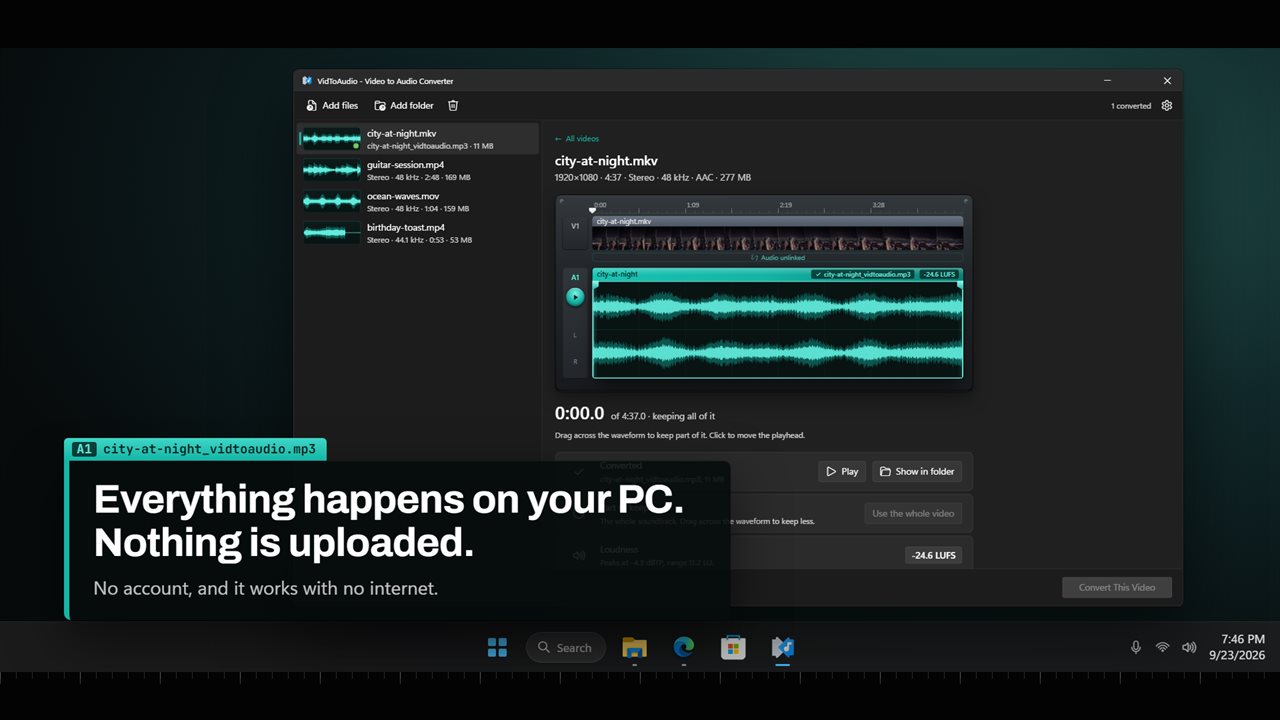
Click a video and its sound is lifted out below the picture as a big stereo waveform, the way a video editor shows it. Press play to hear it. Click the waveform to move the playhead.
Keep only what you need
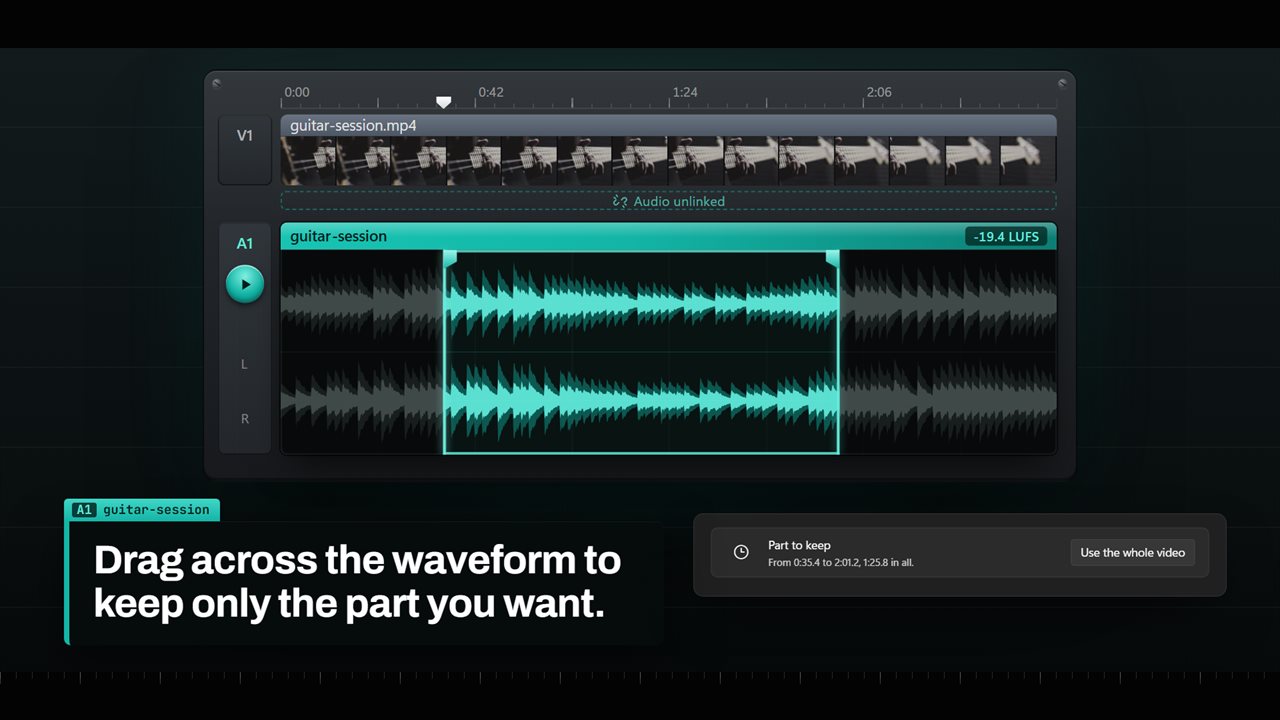
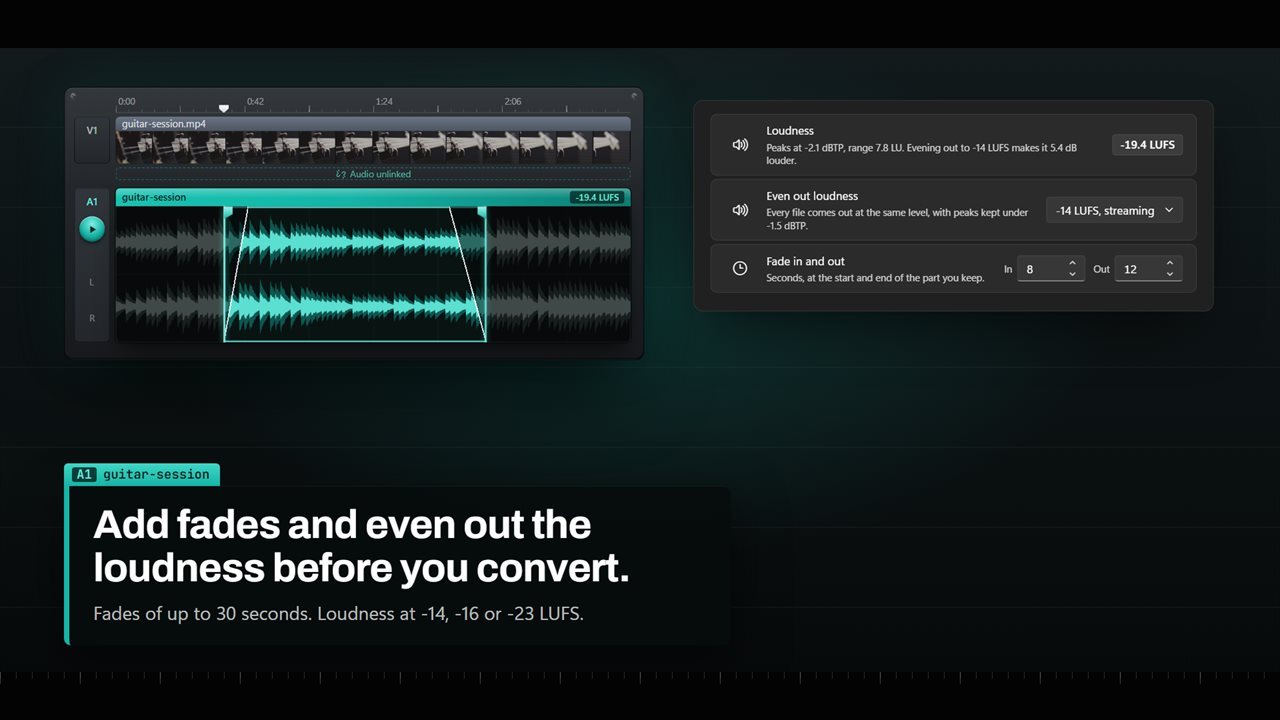
Drag across the waveform to keep just part of the sound, then drag the start and end markers to get it exactly right. Add a fade in and a fade out of up to 30 seconds, and hear them before you convert.
Even out the loudness
VidToAudio measures how loud every video is. Turn on loudness leveling and every file comes out at the same level: -14 LUFS for streaming, -16 for podcasts or -23 for broadcast, with the peaks kept in check.
More than one soundtrack
Movies often carry several soundtracks, in different languages. VidToAudio lists them, so you can choose which one to extract.
Where the audio goes
Save each file next to its video, into a folder you choose, or in place of the original video. A video with no sound is marked in the list and skipped, instead of turning into an empty file.
On your PC only
Everything happens on your own computer. Your videos are never uploaded, there is no account, and it works with no internet.
Features
- Pull the sound out of any video and save it as MP3, WAV, M4A, AAC, FLAC, OGG, Opus or WMA
- Reads MP4, MKV, MOV, AVI, WMV, WebM, FLV, MPEG, M2TS, 3GP, VOB and more
- Converts audio files too, such as WAV, FLAC, M4A, WMA and AIFF
- Add a batch of videos, or a whole folder, and convert them all in one go
- See each video's sound as a big stereo waveform, with its picture laid out above it
- Listen before you convert. Press Space to play the part you're keeping
- Drag across the waveform to keep only part of the sound, then nudge the start and end
- Fade in and fade out, up to 30 seconds each
- Shows how loud each video is, measured in LUFS
- Even out loudness to -14 LUFS for streaming, -16 for podcasts or -23 for broadcast
- Pick the bitrate, from 64 to 320 kbps, or leave MP3 and OGG on Auto for the best quality
- 16-bit, 24-bit or 32-bit float WAV, and 16-bit or 24-bit FLAC
- Choose the sample rate, 22,050, 44,100 or 48,000 Hz, and stereo or mono
- A video with more than one soundtrack lets you pick which one to extract
- Save next to the video, into a folder you choose, or in place of the original
- Videos with no sound are marked and skipped, so you never get an empty file
- Everything happens on your PC. Nothing is uploaded, and there is no account
Details
- Works on
- Windows 10 (1809 or later) and Windows 11
- Download
- About 74.8 MB
- Version
- 2.0.3, updated October 2026
- First released
- July 2023
- Price
- $2.99 once. No subscription.
- Category
- Photo & video
What's new in 2.0.3
- New: see each video's sound as a big stereo waveform, and play it before you convert
- New: drag across the waveform to keep only part of the sound
- New: fade in and out, and even out the loudness for streaming, podcasts or broadcast
- New: choose the bit depth and channels as well as the bitrate and sample rate
- New: pick the soundtrack from videos that carry more than one
- Videos with no sound are now marked and skipped
Questions
Anything else? Ask us
Which versions of Windows does it run on?
Windows 10 (version 1809 or later) and Windows 11.
Is it a subscription?
No. VidToAudio is a one-time purchase of $2.99, and updates are included.
How do I get it?
EvlarSoft apps are moving to direct downloads from this site. Ask to be notified and we will email you as soon as VidToAudio is ready to download.
More from EvlarSoft
 Any Sound ConverterConvert music and audio between MP3, WAV, FLAC, M4A, AAC, OGG, Opus, WMA and AIFF, a whole batch at a time.
 Quick Audio to WAV ConverterDrop a file on the pad and click Convert to WAV.
 Audio To WAV ConverterTurn MP3, AAC, WMA, FLAC, M4A, OGG and more into WAV, a whole batch at once.